

It has been a while since I ranted about GA4.
Well, it is time for another Joe-style blog post in which I will do my best to walk you through an incredibly frustrating issue that I discovered with using Google Tag Manager to implement a Google Tag.
The background
I manage the website for a wonderful holiday let cottage in Pembrokeshire. It is a simple WordPress website that uses the Bookalet engine to accept bookings on the https://www.peg-y-don.com/book/ page.
It is very easy to implement and the Bookalet platform does a good job, so it is a natural choice if you want to offer online booking on your own website.
The booking calendar is, however, served in an iframe which always induces a mild sense of terror if you are an SEO nerd and want to track everything. Thankfully, Bookalet offer a fairly simple solution to firing events in GA4 which scratches that particular SEO nerd itch.
I use Google Tag Manager to fire all scripts and track events such as clicks on the ‘book now’ button. I am generally a big fan of Google Tag Manager, although it is far from ideal when trying to track events in iframes.
I would normally want to track all user interactions on the calendar, but this is always a challenge when you are hosting a 3rd party application in an iframe and am happy to settle on a simple event to signal that a booking has been made.
By firing a ‘purchase’ event in GA4, I can easily see which traffic sources are the producing actual bookings and we can optimise any Google Ads campaigns that we run.
The headache
The issue was fairly simple – no events were making it to GA4 when a booking was made.
I tried all sorts of combinations of different ways of injecting the required scripts on the page, but none of them worked.
I queried it with Bookalet, who were (correctly) adamant that all was well at their end and the issue lay with the fact that we had no Google Tag (gtag) on our website.
I was initially suspicious of this as I know that I *had* put the gtag on the site, using the incredibly simple implementation in Google Tag Manager, where you essentially just have to put in the correct tag id in to the ‘out of the box’ tag that is provided for adding a gtag. I had an ‘all page’ trigger set and could clearly see the gtag when using Tag Assistant to try to debug the problem, so I wasn’t entirely convinced by the suggestion that there was no gtag on the booking page.
A bit more testing did, however, reveal that all was not well with the gtag as I could see an error in the console in web developer tools:
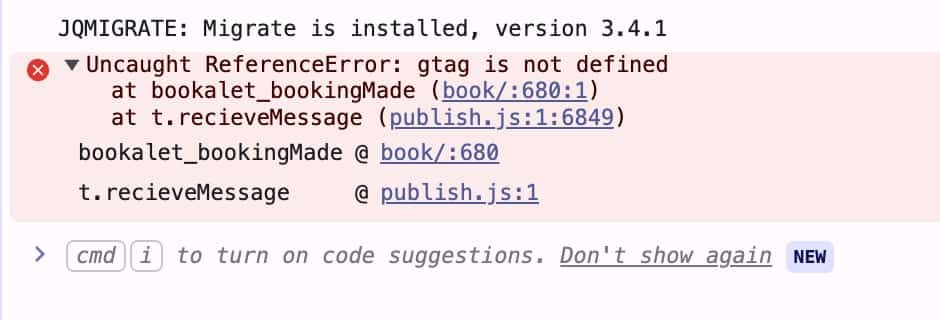
So, the Bookalet script was doing its job but there was something wrong with the gtag, despite it definitely being added by Google Tag Manager.
Cue another frustrating session of debugging and trying to work out what could possibly be going wrong. Thankfully, Stackoverflow came to the rescue and put the spotlight on the fact that the default gtag implemention in Google Tag Manager is missing some critical code.
In a nutshell, the default implementation is good enough to deploy GA4 but Google Tag Manager does note expose the Google Tag API by default. In other words, gtag simply does not exist and you are unable to push events in the way that you would naturally expect to be able to do.
To be fair, most of the official documentation suggests pushing events to the dataLayer and then configuring GA4 event tags in Google Tag Manager to listen for those custom events, but this is unnecessarily complicated and feels at odds with the fundamental premise of Google Tag Manager making it easy for non techies to manage scripts on a website.
By adding the missing code to the booking page, by removing the official gtag script and replacing with a custom html tag that contained the complete code, the booking tracking code suddenly started doing what it is supposed to do.
The rant
I find it incredibly frustrating that you have to manually add a snippet of code to recreate the API that Google’s own toolchain fails to provide out of the box. How can it be possible that Google Tag Manager does not fully support Google Tag’s API without manual intervention?
This is like buying a Google Pixel phone and discovering Gmail only works if you manually install a third-party mail client.
In my humble opinion, it reflects a broader pattern in Google’s marketing stack:
- GA4 replaced Universal Analytics with an unfinished product
- Tagging shifted from simple scripts to sprawling containers
- Documentation is split across multiple teams and product eras
- Best practices change faster than Google updates its docs
The result is an ecosystem where even experienced practitioners rely on Stack Overflow threads, blog posts and tribal knowledge rather than official guidance.
Being blunt, Google has become a mess. Just consider the various options that Google now offers to track website activity:
- Google Tag (gtag.js)
- Google Tag Manager
- Google Analytics 4
- Google Ads and conversion tags
- Server-side tagging
- Measurement Protocol
- A pile of migration guides that contradict each other
This is a sprawling, poorly coordinated analytics ecosystem where product teams are shipping overlapping tools and Google’s documentation lags reality. The irony of Google’s official tag management platform not fully implementing Google’s official tagging API is stark.
For a company that prides itself on engineering excellence, this is surprisingly slapdash. Its marketing stack increasingly feels like a corporate Frankenstein: stitched together, backward compatible and internally inconsistent.
All extremely frustrating for us digital marketers.
The learnings
Other than an excuse for a rant, what can we learn from this particular journey?
My key takeaways, which I hope may help, are as follow:
- Assume
gtag()will break when using Google Tag Manager - Prefer
dataLayer.push()and GTM event triggers - Validate everything in the browser console and network tab
- Treat Google documentation as a starting point, not a source of truth
We got there in the end in this case, but it was a few hours of hair pulling that really shouldn’t have been needed. I haven’t got enough hair left these days to endure much more…