
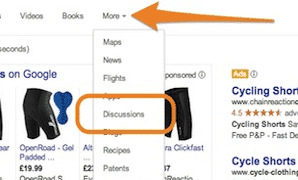
Last month the powers that be at Google dealt another blow to users by disabling the discussion search filter, but fear not, here are a few tricks for finding those elusive conversations.
If you’re unfamiliar with the discussion search filter, check out this blog post from Matt. Essentially, Google is making it harder to find topic specific conversations, whether it be on forums, blogs or other thread-based feeds.
However, as illustrated by my trusty ‘cycling shorts’ example, the tricks below should help you quickly, and easily, find discussions around your search queries:
Discussions button for Google Search
If you’re a fan of Chrome, give the Discussions button for Google Search a try! Once you’ve downloaded the button, Discussions will appear back in the ‘More’ menu on the Google search results, allowing you to search forums and message boards for up-to-date conversations.
Whilst Google has disabled the familiar Discussion search filter we all knew and loved, this button is an excellent workaround as it will modify your search query to generate relevant results.
Farewell, ‘/?tbm=dsc‘, and hello to ‘inurl:forum|viewthread|showthread|viewtopic|showtopic|”index.php?topic” | intext:”reading this topic”|”next thread”|”next topic”|”send private message”‘.
Doesn’t quite roll off the fingertips but does generate similar results…


‘keyword intext:forum “post” | inurl:forum | “posts:” | inurl:viewtopic’
Alternatively, the string above at the end of your search query will produce similar results by applying filters to the search results. For example:
